A Coldcard testnet export can trigger Sparrow’s P2WSH derivation error when Sparrow is on mainnet. Check the network before changing multisig settings.
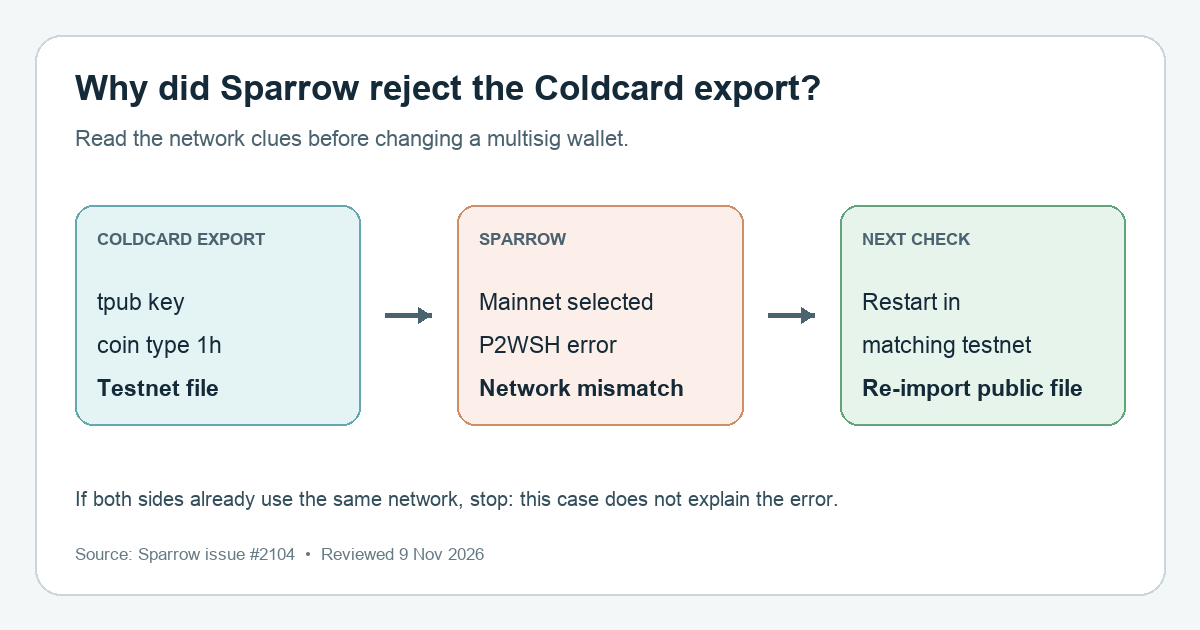
A Coldcard user importing an Export XPUB file into Sparrow 2.5.6 hit “Correct derivation not found for script type: P2WSH.” That sounds like a broken multisig path. In the reported case, the maintainer found a simpler mismatch: the Coldcard export was for Bitcoin testnet, while Sparrow was running on mainnet. Check the network in the export and in Sparrow before changing any wallet policy or derivation path.
What the export and error actually tell you
The file in that report contained testnet extended public keys (tpub) and a testnet coin type (1h). Sparrow's generic P2WSH derivation message did not name the network mismatch. The maintainer identified the mismatch and said a future release would show a clearer error. As of this review, Sparrow 2.5.6 is the latest published GitHub release, so do not assume the generic message has already been replaced in a released build.
This is a diagnosis for that testnet-export/mainnet-Sparrow combination, not a claim that every P2WSH derivation error has the same cause. The extended public key and derivation path are public wallet metadata, but they can still reveal wallet activity; inspect the file locally and do not post it publicly. Never share a seed phrase or private key.
Match Sparrow to the Coldcard test network
First confirm that the export came from a testnet Coldcard setup. The key prefix alone is a clue; the network and coin type together make the reported case specific. If this is a mainnet wallet holding real BTC, stop here and do not switch networks to make an import pass.
For a testnet export, use Sparrow's Tools → Restart in Testnet menu. Sparrow's FAQ says this restarts the app with a separate testnet configuration. The maintainer's answer to this issue specifies Testnet4 or Testnet3, matching the testnet used on the Coldcard. If Sparrow asks for a server, its testnet FAQ also requires a server running on that same network. Then import the same public export file again and verify that the displayed network, wallet policy, and cosigner fingerprints match your intended test wallet.
If the import succeeds in the matching testnet environment, the network mismatch was the blocker. The issue did not include a user confirmation after the maintainer's reply, so treat this as the official diagnosis and next check, not a proven outcome for every Coldcard file.
If the networks already match
Do not edit a multisig derivation path, replace a cosigner, or fund a newly created wallet just to silence the error. A matching network rules out this particular explanation, but the same generic error may have another cause. Check the intended script type and cosigner export against your original wallet setup, then use Sparrow's issue tracker for a version-specific diagnosis. You can share the exact error, Sparrow version, selected network, and whether the export is testnet or mainnet without sharing the export file itself.
For a different symptom—an imported wallet that opens but shows an unexpected balance—start with address, script-type, and derivation checks. That is a different diagnostic branch from an import rejected before the wallet opens.
Official sources
Product interfaces and recovery policies can change. Confirm the current steps before acting.