Unexpected Ledger Wallet Mobile password prompt? Verify the installed app, identify its app lock, and keep device PIN and recovery words out of the field.
A Ledger Wallet Mobile user saw a password screen for the first time in two years. Their first-hand post includes the actual prompt. This can be Ledger Wallet's local app lock, especially after mobile security changes; it is not a request for the Ledger device PIN or your Secret Recovery Phrase. But an unexpected password screen deserves a source check before you type anything. The screen alone cannot prove that an app is genuine.
Which password is Ledger Wallet asking for?
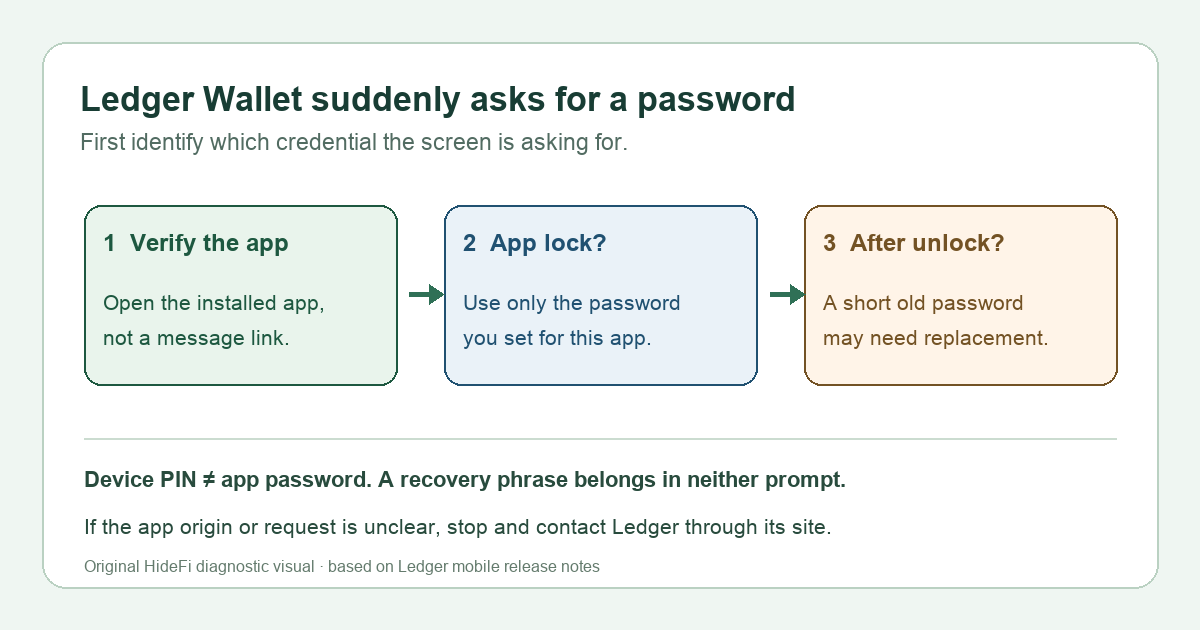
The app-lock password is the one previously set to open Ledger Wallet on that phone. It protects access to the app's local view and settings. Your hardware Ledger device has a separate PIN; the Secret Recovery Phrase is the backup for the device's keys. Do not put a device PIN or recovery words into an app password field. In the same public discussion, Ledger customer success described a change to mobile app-password rules and noted that a biometric user may still be asked to enter a password.
This distinction matters because a normal app-lock prompt can appear even if the hardware device is disconnected. It does not mean the app needs you to import or “verify” your wallet backup. The original report's screenshot shows a dark password-entry screen with a Ledger mark and a Confirm action. That appearance matches Ledger's mobile 4.22 release description of its unlock screen, but appearance alone is not an authenticity test.
Why now, after Face ID or fingerprint worked before?
Ledger's mobile 4.22 release notes describe revised app-lock handling at launch and after the app is left, with biometrics and a password as separate methods. Mobile 4.23 adds a 15-second grace period before relocking after a return from the background. Ledger customer success says a user with biometrics may be asked for the app password to confirm new security settings. The Reddit user did not provide enough diagnostic detail to prove which local setting caused their exact prompt. Check the app's installed version and protection settings after you have safely unlocked it; do not assume that a biometric change, forgotten password, or account compromise is the cause.
There is a second, more specific screen after unlock. Ledger's mobile 4.23 release documents an in-app flow that requires an existing password shorter than six characters to be replaced after successful unlock. Ledger customer success described the six-character requirement as beginning with 4.22; the published 4.23 change identifies the migration prompt for already-short passwords. Rollout and installed builds can differ, so use the screen and version actually on your phone rather than treating a single version number as a universal trigger. If you see a change-password request after entering the old app password, this is a different step from the initial unlock.
Check the prompt before entering anything
Open Ledger Wallet from the app icon you installed through the official App Store or Google Play, not a link in an email, search ad, or private message. If the app was just installed, the icon or publisher looks unfamiliar, or the prompt sends you to a website, stop and start from Ledger's official app page or official support. Do not install an “update” attached to a message. Ledger's public mobile release list lets you distinguish mobile tags from desktop tags, but a release tag alone does not authenticate a particular app already on your phone.
If you are confident you are inside your authentic installed Ledger Wallet app and remember its app-lock password, use that password in the app. If a short-password upgrade then appears, follow only the in-app flow and verify that the new password unlocks the same app afterward. The release change says this migration runs after a successful old-password unlock; it does not ask for the recovery phrase. Do not enter the old password into a website or give it to anyone claiming to be support.
What if I never set or no longer remember that app password?
Do not guess a device PIN or type your Secret Recovery Phrase into the password field. Use Ledger's official support from a separately opened browser and describe the phone platform, app version, and exact screen without sharing credentials. The mobile release notes describe a Forgot password path and explain that reinstalling drops the local app lock and app data. That may also clear local account lists and settings. Do not reinstall merely because a forum reply suggests it; first confirm your own backup and how you will re-add accounts with Ledger's current guidance. This article does not recover a forgotten password or verify an individual app installation.
The useful result is simple: identify whether you are facing an app-lock password prompt, a short-password change after unlock, or an unexpected external request. Only the first two belong inside the authentic app. For a related but distinct desktop issue, see why Ledger Wallet can offer an update before its Help Center lists the version. Guidance reviewed November 9, 2026.
Official sources
Product interfaces and recovery policies can change. Confirm the current steps before acting.