Trezor Suite says firmware authenticity check failed? Tell an offline verification banner from a blocked-device warning and choose the safe next step.
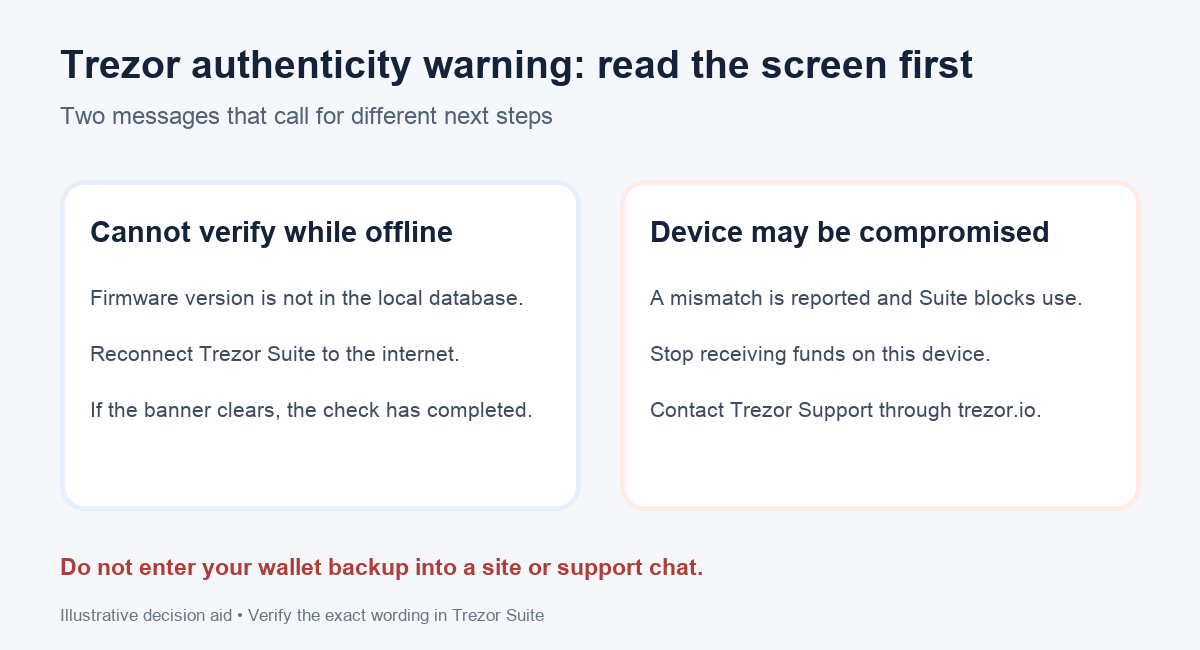
A Trezor Suite message saying “Firmware authenticity check failed” can look like an ordinary update error. It is a security warning, so the first useful step is to read the exact message. If Suite only says it cannot verify a firmware version while offline, connect Suite to the internet and let the check finish. If it says “Your device may have been compromised” and blocks normal use, stop using that device to receive funds and contact Trezor through the support button or trezor.io. Trezor describes these as different states.
A Trezor Forum discussion shows why the wording matters. One Safe 5 owner saw the alarming authenticity warning after an unintentionally released firmware build. That historical case does not prove a new warning is harmless, or that every device with this warning is counterfeit. Treat the device as unverified until Trezor resolves your particular case.
The flow below is an illustrative reading aid, not a test performed on anyone's wallet.
Is this an offline verification banner or a blocked device?
I would first note the Trezor model, the Suite version, and the words on the screen, without dismissing them as a generic connection problem. Trezor explains that an offline Suite may lack the firmware version in its local database. In that case it displays a banner saying the check must be verified online. When Suite gets online, it checks the remote database; a matching version and revision clears the banner. If you still see a warning after that, do not keep reconnecting and assume it passed.
A mismatch is a different branch. Suite may show a modal saying the device may have been compromised and direct you to Contact Trezor Support. This is what Trezor's example looks like:
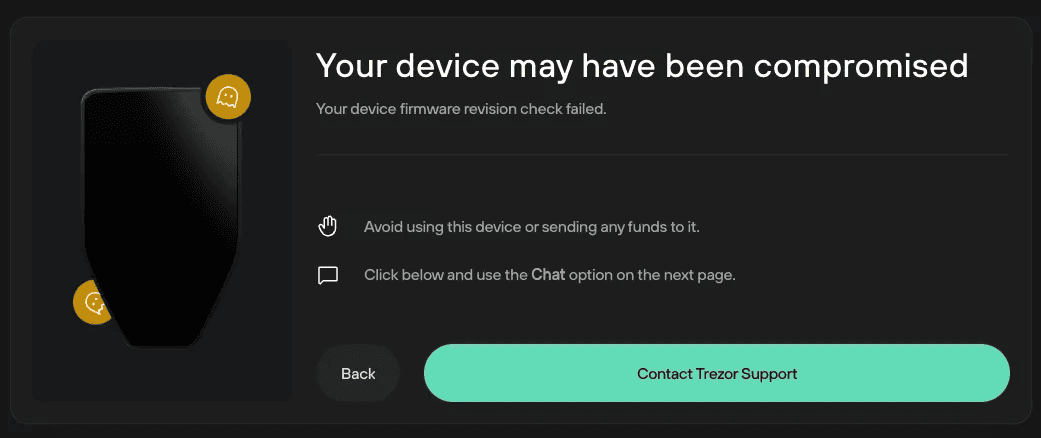
A revision check compares the reported firmware version and revision with Trezor's released-firmware records. A separate hash check looks for altered firmware. Trezor says Suite combines the checks under one setting, so the wording alone is not a full forensic diagnosis.
What should I do if Suite says the device may be compromised?
If the Trezor is new and not initialized, stop using it and contact Trezor Support. Do not create a wallet or send a test deposit just to see whether it works. Trezor gives this explicit stop-and-contact route for a new device.
If you already used this device to hold funds, the stakes are different. Do not generate a new receive address or send additional funds to it. Use the Contact Trezor Support button in the official Suite screen or navigate to trezor.io yourself; describe the model, exact warning, Suite version, whether the device was previously initialized, and the firmware update history. Trezor's guide says an existing user may need to move funds to a newly secured wallet, but the route depends on the setup. Confirm the destination and recovery plan before signing anything. HideFi cannot determine from a screenshot whether your specific device is genuine or whether your backup is exposed.
Never send your wallet backup, PIN, or passphrase to anyone claiming to be support. Trezor says its team will not ask for them. Do not turn off authenticity checks, install a firmware file from a forum, or type recovery words into a website to make the warning disappear. A historical user-reported workaround is not a diagnosis for your device.
How do I know the issue is resolved?
For the offline-banner branch, the check finishes online and the banner disappears without a mismatch warning, as Trezor documents. For a blocked-device warning, use the case-specific instruction from Trezor Support; merely closing the modal is not evidence that the device passed. Until then, treat the device and any wallet backup potentially used with it as a security case, not an ordinary app refresh issue.
If the message instead says the firmware is corrupted after an interrupted update, that is a separate diagnostic path; see our Trezor firmware-corruption and reset checks.
Official sources
Product interfaces and recovery policies can change. Confirm the current steps before acting.