If Slush opens an empty account while old staked SUI remains onchain, compare public addresses and sign-in methods before trying any recovery action.
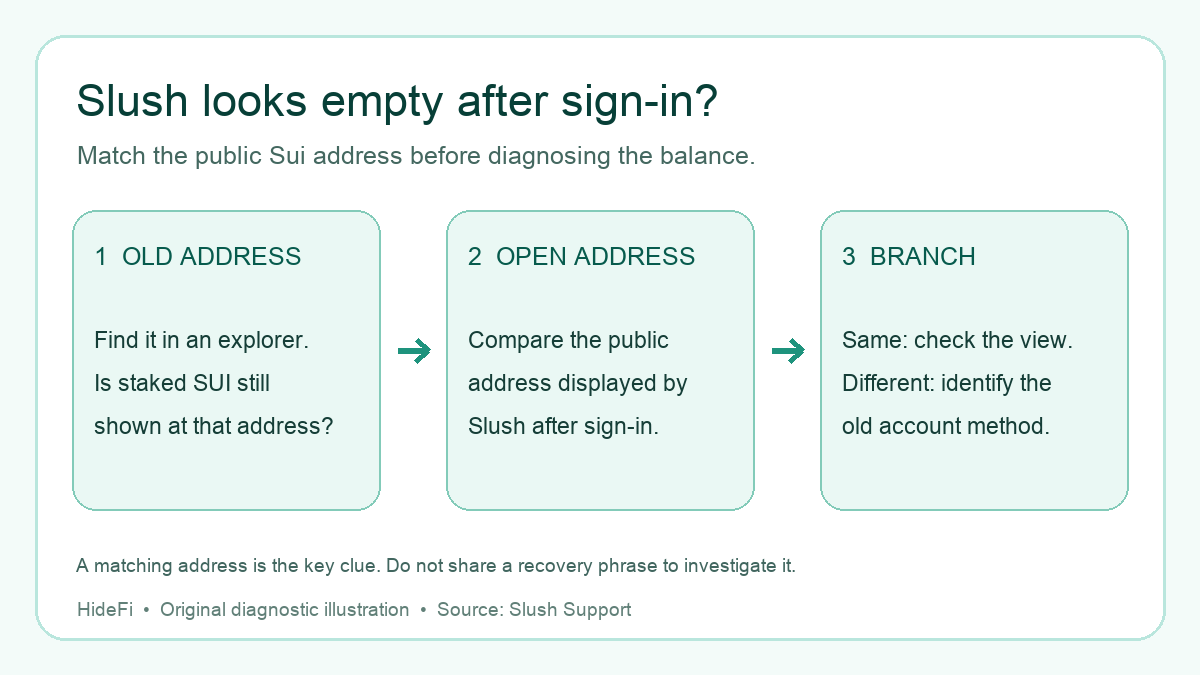
A Sui Wallet user described a frightening mismatch: after opening Slush with Google, the account looked empty. A passphrase route also appeared empty, yet their old staked SUI was still visible at a public address on a Sui explorer. The first question is whether Slush opened that exact old address. An empty account at a different address is not evidence that the stake disappeared. It also does not tell you which credential controls the old address.
Write down only the public address you need to match
Find the old Sui address in a transaction record or explorer bookmark, and confirm that the staked position is still shown for that address. Compare it character by character with the public address currently displayed in Slush. The current Slush address guide says you can copy that address from the Current Account or Manage Account menu, or from Receive SUI on mobile. Do not publish a QR code while asking for help. Do not share a recovery phrase, private key, or verification code with anyone while doing this check. A public address is enough for the comparison.
If the addresses match, you are looking at a display or account-view question. Check the stake view and current Slush status. Slush says a temporary $0 display can need a home-screen refresh; if the staked position still does not appear after a reasonable wait and refresh, use official support. If they differ, the empty balance belongs to the account currently open in Slush; work out which sign-in method created the old address before taking any action.
Google login and passphrase are separate recovery routes
Slush's recovery guide says a Social Login wallet is recovered with the same Google or Apple account used to create it. A Passphrase account instead requires its own recovery phrase or private key and the official Import Existing Account route. Trying both methods can therefore open different addresses; their balances do not merge just because the same person owns them.
Check which Google account was actually selected and compare its Slush address with the old public address. Slush warns that choosing another Google account opens another wallet. If you know the old wallet was a Passphrase account, use only Slush's official app or extension import flow on a trusted device; never enter a recovery phrase into a website, message, or support form. This check may identify the correct account, but the forum report did not establish which credential controls the old stake, so there is no verified one-click recovery for that case.
Check whether the right account is in the profile but locked
A Slush Profile can contain multiple accounts. Slush says accounts linked to a profile can appear on another device but start locked until each is unlocked with its own method. In Profile → Accounts, look for the public address that matches the old stake; if the matching account is present but locked, use that account's own sign-in method in the official Slush interface. Slush documents the profile and unlock behavior. A phone number or email linked to a profile helps import the account list across devices; it does not replace an individual account's credential.
If no account you can legitimately access matches the old address, stop trying random phrases or third-party recovery tools. Gather the old public address, the new public address, device/app details, and the sign-in method you remember, then contact Slush through its official support page. Do not send support the phrase, private key, or code. If the missing item is ordinary SUI in a wallet you already control rather than an old staked position, see the separate Sui stake and gas guide.
Official sources
Product interfaces and recovery policies can change. Confirm the current steps before acting.
- Slush: Recover a wallet after losing a device or password
- Slush: What is Slush Profile?
- Slush: Use the same wallet on multiple devices
- First-hand question about old staked SUI and empty Slush account
- Slush: Find your current wallet address
- Slush: $0 balance with funds onchain
- Slush: Sign in with Google
- Slush Tour: official account-icon screen example