Ledger Wallet still shows a Bitcoin test transfer as pending? Check its transaction ID and receiving output, then refresh the desktop app if it is confirmed.
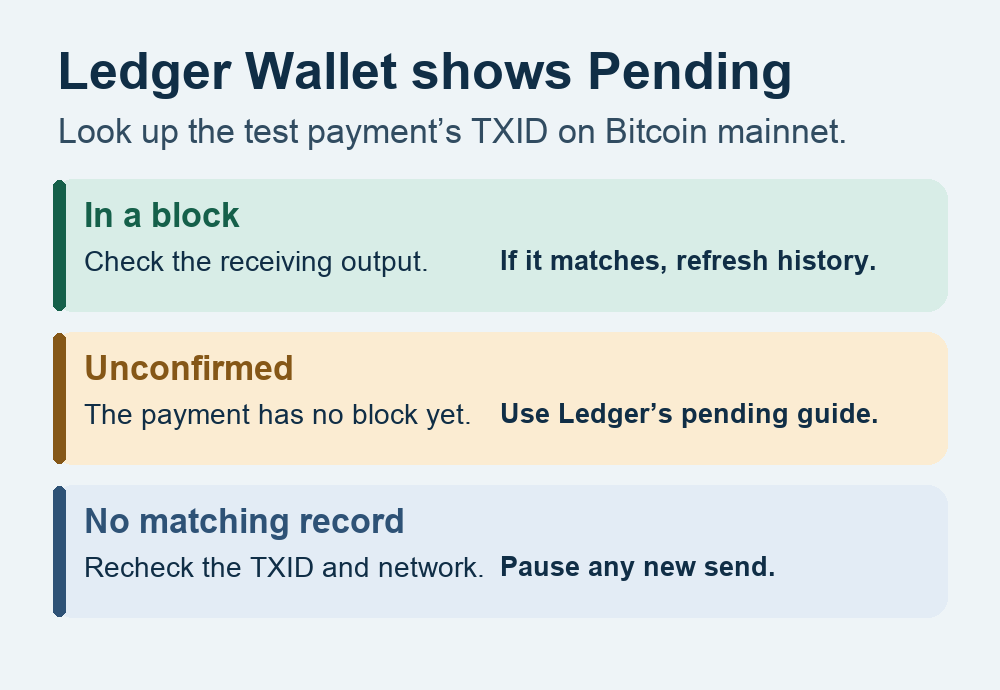
A Ledger Wallet user sent a small Bitcoin test payment. The receiving wallet showed it, Ledger still said Pending, and the next send failed. The report doesn't establish why the next send failed, but there is a way to check the first payment before trying anything else. Look up that exact transaction on Bitcoin mainnet. If it is in a block and pays the intended address, refresh Ledger Wallet's history instead of sending the test payment again. User report.
This is for on-chain Bitcoin in Ledger Wallet Desktop, formerly Ledger Live. The desktop route follows Ledger's current help. Ledger's public desktop release record lists 4.26.1 at the time of review. Ledger Wallet desktop release.
Check the test transfer's transaction ID
Open the test payment in the Bitcoin account's history and copy its transaction ID (TXID), the 64-character identifier for that payment. If the receiving wallet has the transaction details, you can get it there too. In Blockstream Explorer, choose Bitcoin and look up the full ID. A public explorer only needs the TXID for this check. Keep your wallet disconnected and your recovery words offline. Blockstream's transaction lookup guide.
- In a block. Check that a receiving output shows the intended address and test amount. With that match, the test payment is confirmed. A second output may be change, so compare the intended output rather than the total.
- Unconfirmed. A receiving wallet can display an incoming payment before a block includes it. Follow Ledger's guidance for a genuinely pending Bitcoin transaction. Clearing Ledger's cache cannot move it into a block.
- No matching record. Verify the full TXID and network, then check another Bitcoin explorer or your node. Pause any new send while you establish what happened. One explorer missing the transaction does not establish that it was canceled.
Refresh Ledger Wallet after the chain check
Use the current desktop app from Ledger's official download page. If the first payment is confirmed and Ledger still says Pending, check Ledger Status for a Bitcoin service disruption. Wait until service is restored if Ledger reports one. On the desktop app, open the top-right Profile menu, then Settings → Help → Clear cache. Read the dialog and select Confirm. Ledger Wallet reopens to the dashboard and rebuilds its locally displayed transaction history. Wait for synchronization to finish, then open the same Bitcoin account and check the same operation. Ledger's sync troubleshooting and cache instructions.
Check any second send separately
If you already tried the larger payment, treat it as a separate operation. Check its own activity and TXID, if one exists, before another attempt. The test payment's confirmation only settles what happened to that test. If the history still disagrees with the chain or the next send still fails after syncing, go to Ledger Support yourself and share the app version, Bitcoin network and exact error. Keep the recovery phrase offline. If Ledger gives a device/account mismatch error, see how to check which Ledger controls the Bitcoin account.
Official sources
Product interfaces and recovery policies can change. Confirm the current steps before acting.