Check BTC’s LIGHTNING deposit status before creating an invoice. Separate network maintenance, invoice errors and a payment already sent.
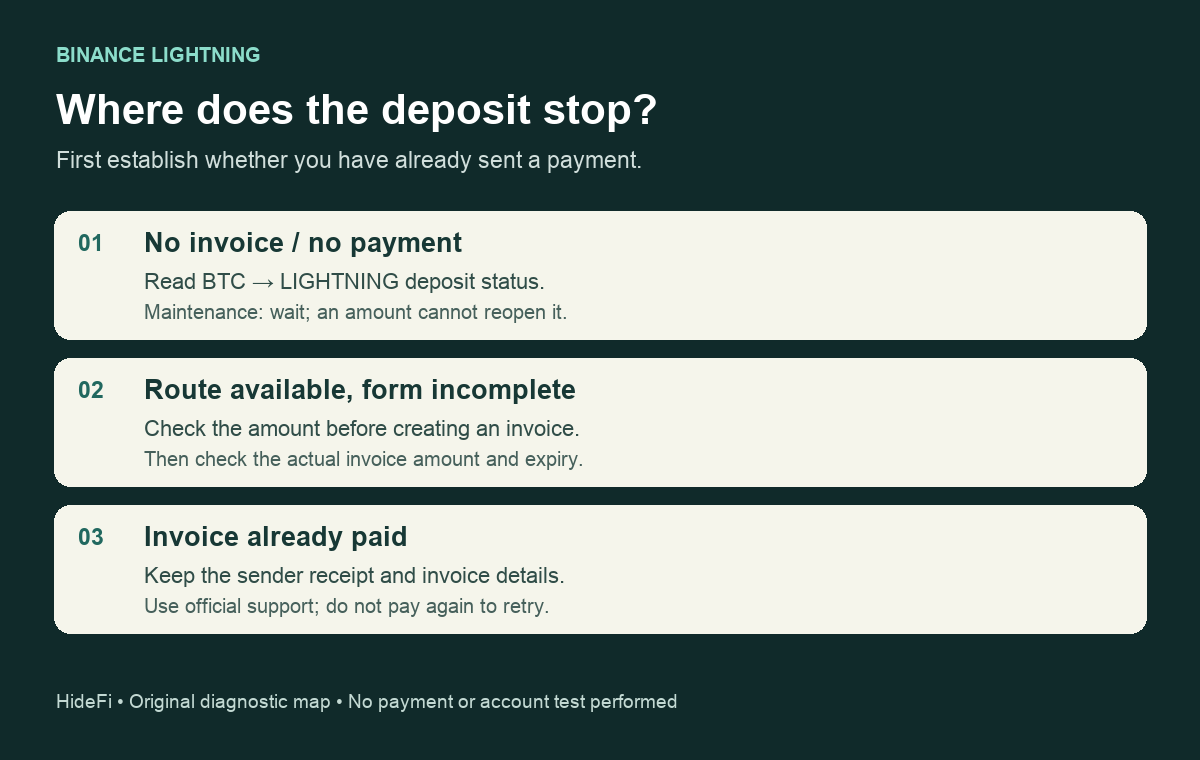
If Binance shows Lightning deposits as suspended before you create an invoice, check BTC’s LIGHTNING deposit status first. Filling in an amount cannot clear wallet maintenance. A payment you already sent needs a different check.
A Binance user asked whether the suspension affected everyone after being unable to deposit through Lightning. That question is useful because a disabled route can look like a problem with one account. The public network table lets you check the route without logging in or sending a test payment.
Read the Lightning row, not just the BTC heading
Open Binance’s Deposit & Withdrawal Status page, search for BTC, and expand its row. Read the deposit column for LIGHTNING. The coin-level message Partial Deposit Suspended means you still need the individual network rows; it does not identify which route is unavailable.
At 14:38 Beijing time on November 12, 2026, HideFi’s read-only check showed Lightning deposits and withdrawals under Wallet Maintenance, while the ordinary BTC network showed Normal. This is a dated observation, not a live status widget or a reopening promise. Recheck the page before relying on it.
That maintenance label supports a network-service explanation for an unavailable new Lightning deposit. It does not establish that every account is eligible to deposit, why maintenance started, or whether an earlier payment credited. If the table is empty or fails to load, it has supplied no usable route result.
Separate maintenance from an incomplete invoice form
Binance’s Lightning guide describes choosing BTC, selecting Lightning and entering a deposit amount before Create Invoice becomes usable. An empty amount is therefore a separate condition from a network suspension. Completing the field is not a workaround for maintenance.
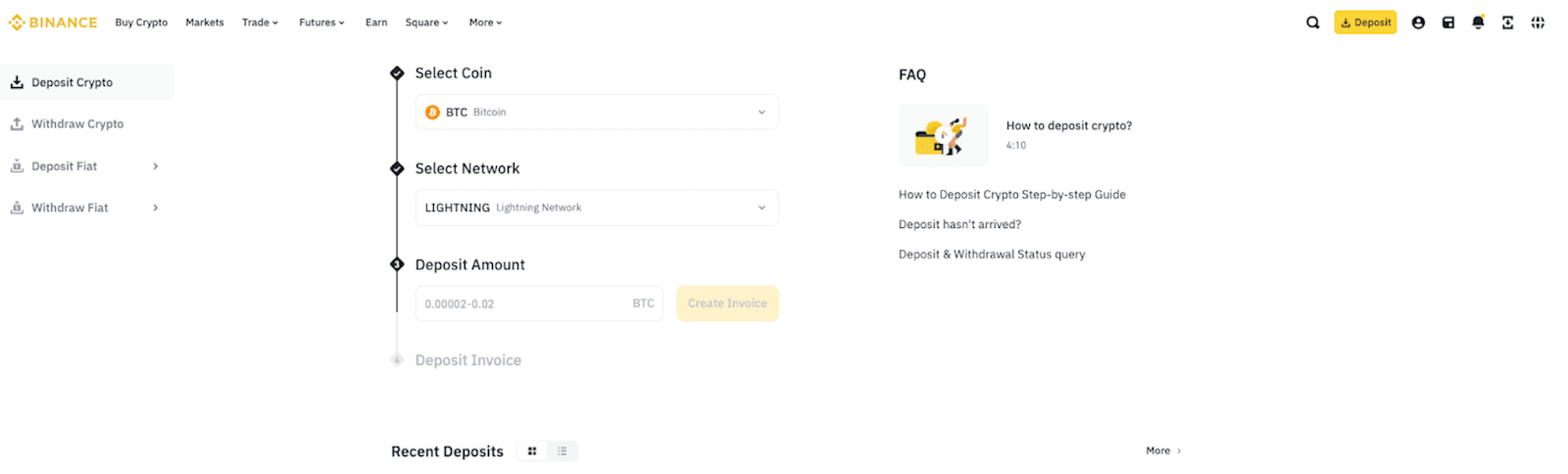
The guide says an invoice expires after 30 minutes. Once the route is available to you, check the actual invoice’s amount and expiry before considering a payment. A previously saved invoice is not proof that the service has reopened. Availability can also differ by region; the FAQ specifically notes regional limits for Lightning withdrawals, so a missing option alone does not diagnose this deposit case.
What to do while the route is in maintenance
Binance’s maintenance guidance describes waiting for restoration and a reminder option when offered. A reminder is a notification, not a reservation or guaranteed time. HideFi did not enable one.
Do not substitute an ordinary Bitcoin address for a Lightning invoice simply because another BTC route says it is open. They are separate deposit choices. This guide identifies the blocked route; it does not recommend another transfer. If your task is a withdrawal instead, use the separate Binance withdrawal-status checks.
If you already paid an invoice
Stop treating this as an invoice-creation problem. Keep the sender’s payment receipt and status, the invoice and its payment hash for private support. The Lightning FAQ has a specific section for deposits that have not arrived; follow that official route without assuming recovery is available. Do not send a second payment merely to clear a pending display.
The useful endpoint is knowing which task remains: wait for a suspended route, complete an otherwise available invoice form, or investigate an existing payment. A public maintenance label cannot resolve an individual account or guarantee a credit. HideFi checked the public page and documentation only; it created no invoice and made no payment.
Official sources
Product interfaces and recovery policies can change. Confirm the current steps before acting.