Solflare Buy vanished on iPhone? Check regional and App Store limits, the official extension route, and how to receive SOL safely if you buy elsewhere.
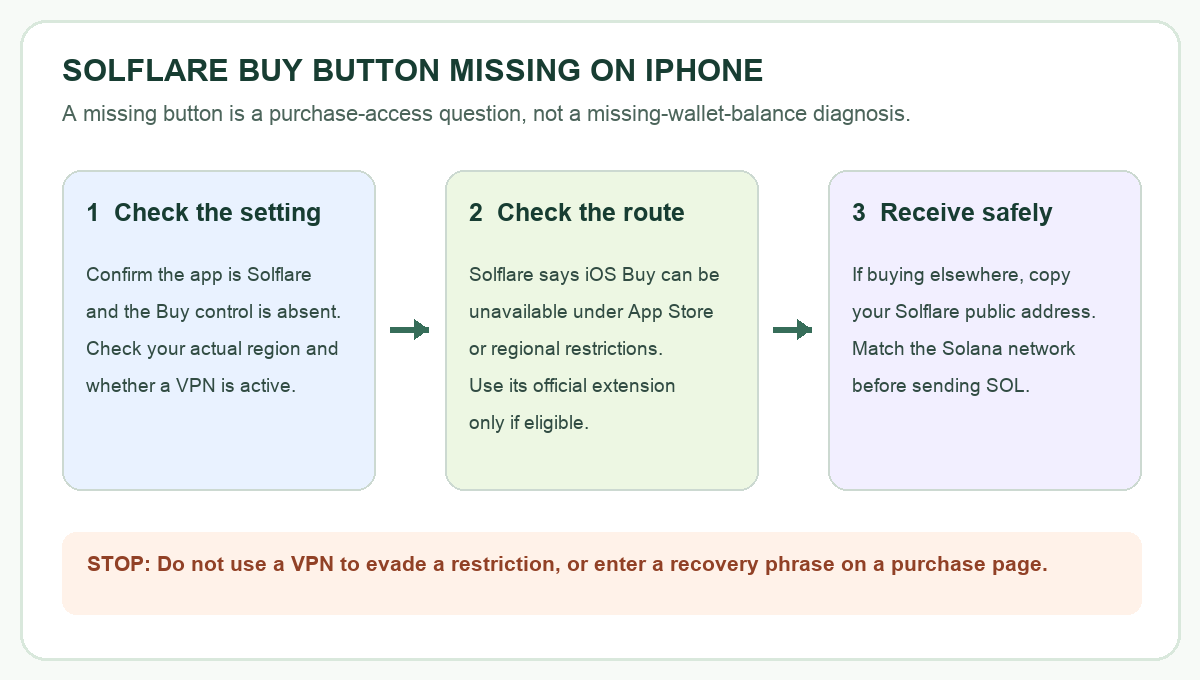
A Solflare iPhone user asked why Buy vanished the day after they had used it to purchase SOL. Several replies reported the same missing control. If I saw that, I would first wonder whether my wallet had broken. The missing Buy button does not, by itself, mean the wallet or its SOL balance is gone. Solflare's help article says buying through the iPhone app can be unavailable because of App Store or regional restrictions. It offers the official browser extension as another route, while eligibility still depends on where and how you connect.
Here is an illustrative troubleshooting path, not a test on that user's phone. The point is to distinguish access to a purchase feature from a payment you already made and from receiving SOL in your wallet.
Why did Buy disappear from my Solflare iPhone app?
Solflare uses a third-party payment provider, or on-ramp, to let users buy crypto with ordinary money. The Buy control opens that purchase route; it is not the button that stores SOL. Solflare lists both regional limits and temporary App Store restrictions as reasons the control may be unavailable in its mobile app. A developer response on the App Store also tied the iOS button's visibility to location and App Store rules in a user's missing-button report. Neither source can diagnose your account from the screen alone.
That changes the first question I would ask. Was Buy absent before any new payment, or did I already pay a provider and then fail to receive SOL? If no payment was made, this is a feature-availability question. If money was charged, keep the provider receipt and use the separate paid but no SOL received guide; making another purchase will not resolve the first order.
What should I check before changing wallets?
Confirm that the missing control is in the Solflare iPhone app, on the account you intended to use. Check your real location and whether a VPN or restricted network is active. A VPN may itself affect what the app shows, according to the developer's App Store response. Solflare explicitly advises against using a VPN to evade a regional block, because provider terms and account access can be affected. Turning off a VPN to check your ordinary connection is different from using one to pretend you are somewhere else.
There is no documented in-app switch in the current Solflare article that reliably restores Buy for every iPhone. Reinstalling the wallet or entering a recovery phrase into a website is therefore a poor first move. If the control remains absent on your normal connection, treat it as unavailable for that context and check Solflare's current help or in-app support. Regional eligibility and payment-provider options can change.
Can I use Solflare's browser extension instead?
Solflare says the Buy route remains available through its browser extension when App Store restrictions hide it on mobile. Get the extension only through solflare.com, the official destination linked by Solflare's help article. On a device where you already use the same Solflare wallet, check whether Buy appears there and whether the provider accepts your actual region and payment method. The extension is an alternative interface, not a promise that a regional or provider restriction will disappear.
If you have never used the extension, adding a wallet to another device is a separate security decision. Follow Solflare's own setup guidance and verify the site's address yourself. Never give your recovery phrase to a person in chat or paste it into an ad, payment form, or “wallet verification” page. You can also leave your wallet on your iPhone and use an eligible purchase service outside Solflare if that better fits your situation.
If I buy SOL elsewhere, how do I get it into Solflare?
First find the public Solana address for the correct Solflare account. Solflare's current address guide points to Receive in the app and explains how to copy the address. A public address is safe to give to a sender; a recovery phrase is not. If your exchange offers several withdrawal networks, select Solana for a SOL transfer and compare the pasted destination with the address shown in Solflare. Solflare's transfer guide specifically warns that a wrong network or destination can cause loss. Check the exchange's fees and minimum before confirming.
The outcome is conditional: if Buy is missing because of iOS or regional availability, the official extension may offer an eligible purchase route; a separate eligible provider can send SOL to your public Solana address. If you already paid and are waiting for delivery, track that specific order with the payment provider instead. HideFi is an independent guide and cannot change Solflare's feature availability or provider eligibility.
Official sources
Product interfaces and recovery policies can change. Confirm the current steps before acting.