Check contract version, original deployment method, and target chain restrictions before trying to clone a Safe address.
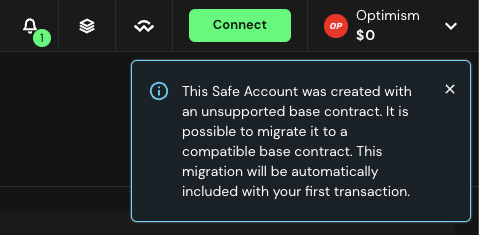
If Add network is unavailable or the same Safe address cannot be deployed on your target chain, check the original deployment before retrying. Safe's multi-chain guide limits this feature by contract origin, version, and network pair. A current version number alone does not prove that an older Safe can be cloned.
Which Safe versions support adding a network?
Safe documents compatibility for accounts created on version 1.3.0 or later. It separately says accounts originally created from master copies 1.0.0, 1.1.1, or 1.2.0 cannot be cloned, even after an upgrade. Some Safes created outside Safe{Wallet} may also be ineligible. Check the account's original deployment transaction or ask official support to identify its deployment method; do not infer eligibility from the version currently displayed.
Why one chain pair may work and another may fail
Safe explicitly excludes zkSync Era from same-address multi-chain deployment. Its current notes also list restrictions for some Optimism, Base, and Avalanche 1.3.0 L2 Safes created through the UI when cloning to Polygon, Arbitrum, Scroll, Blast, Worldchain, or Gnosis Chiado. Read the current matrix for the exact source and target combination before sharing the target-chain address.
What to do when cloning is unavailable
If the target chain is unsupported for this account, create a new Safe on the target chain and verify its address, owners, and threshold before anyone sends assets. A new account will usually have a different address; don't promise senders that the original address works there. If someone already sent funds to the original address on another chain, use the wrong-network deposit checklist because asset recovery depends on a different set of on-chain facts. Never send an extra test deposit just to see whether an incompatible clone appears.
Official sources
Product interfaces and recovery policies can change. Confirm the current steps before acting.