Phantom appeared on your new phone but asks you to sign in? Check the original login method, old device, and imported accounts before resetting the app.
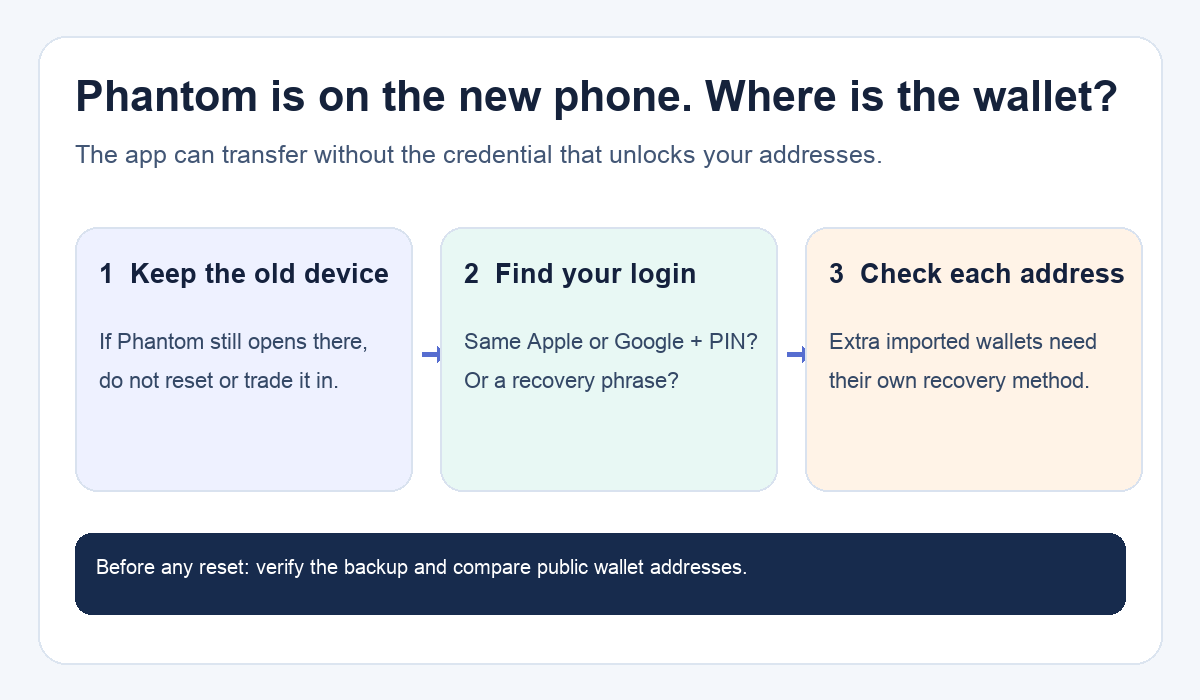
A Phantom user moved their phone data to a new device and expected the wallet to open with everything else. Instead, Phantom asked for Apple or Google sign-in. They could see the app, but were unsure how to reach the wallet. The copied app icon is not proof that wallet access transferred. Phantom says iCloud or Google Drive can bring over the app while its wallet credentials do not move automatically. The next step depends on how that wallet was originally created, not on whether the app looks familiar.
Why did the app transfer but the wallet did not?
A phone backup can restore an application without restoring the secret or sign-in session that controls a wallet. Phantom's new-phone guide and cloud-backup explanation make that distinction. Sometimes a restored wallet may even appear watch-only: you can view an address but cannot sign transactions. That is a clue about access, not evidence that the funds disappeared.
In the original question, the user later said they regained access after restoring an old phone through iCloud. The post does not establish which Phantom credential or session ultimately let them in. Treat that outcome as one person's report, not a repeatable iCloud recovery method.
Which sign-in route actually matches your old wallet?
If the old phone or another device still opens the wallet, keep it untouched while you identify its setup. Phantom's backup guide explains how to view the recovery phrase within a signed-in app: profile avatar → Settings → Security & Privacy → Show Recovery Phrase. Store it offline and never send it to a site, chat, or anyone offering to recover the wallet. Separately imported wallets can have different phrases or private keys; one backup may not cover every address you saw in the app.
On the new phone, use the route you actually used before:
- Created with Apple or Google: On Phantom's welcome screen, choose Continue with the same Apple or Google account and enter the four-digit PIN if asked. A different account may open a different wallet. Phantom's sign-in guide describes this route.
- Created with a recovery phrase: Choose More Options → Import Recovery Phrase in the official Phantom app, using the phrase you backed up. Do not put it into a web form or a link from a message. The sign-in guide says this is the route for a phrase-created wallet.
- Imported another wallet or connected Ledger: Restore that wallet separately with its own authorized method. Phantom's new-phone guide says additional imported wallets do not automatically follow the first wallet. A connected hardware wallet requires its device.
The diagram above is a pre-reset checklist, not a request to reveal credentials. You can compare public wallet addresses on the old and new devices to confirm that you reached the same account.
What if I signed in but an account is still missing?
Phantom says a Google- or Apple-created wallet initially restores its first account. If Account 2 or later is missing, use the account selector above the balance, tap +, then Add Account → Create New Account as described in the new-phone guide. Check the resulting public address before assuming it is the old account. Imported wallets need their own original credentials. A missing display is not by itself proof that on-chain funds moved.
If the transferred app is watch-only or its session seems expired, Phantom lists Settings → Security & Privacy → Reset App, followed by sign-in with the original method. But Phantom specifically says to confirm your Apple/Google access, recovery phrase, and any imported-wallet backups before resetting. If you cannot confirm them, stop. Resetting or uninstalling clears local app data and cannot manufacture a missing recovery method. Phantom does not store a lost recovery phrase for you.
Official sources
Product interfaces and recovery policies can change. Confirm the current steps before acting.