A free NFT led to a missing Phantom balance? Check the public transaction, secure the right kind of exposure, and understand what can and cannot be recovered.
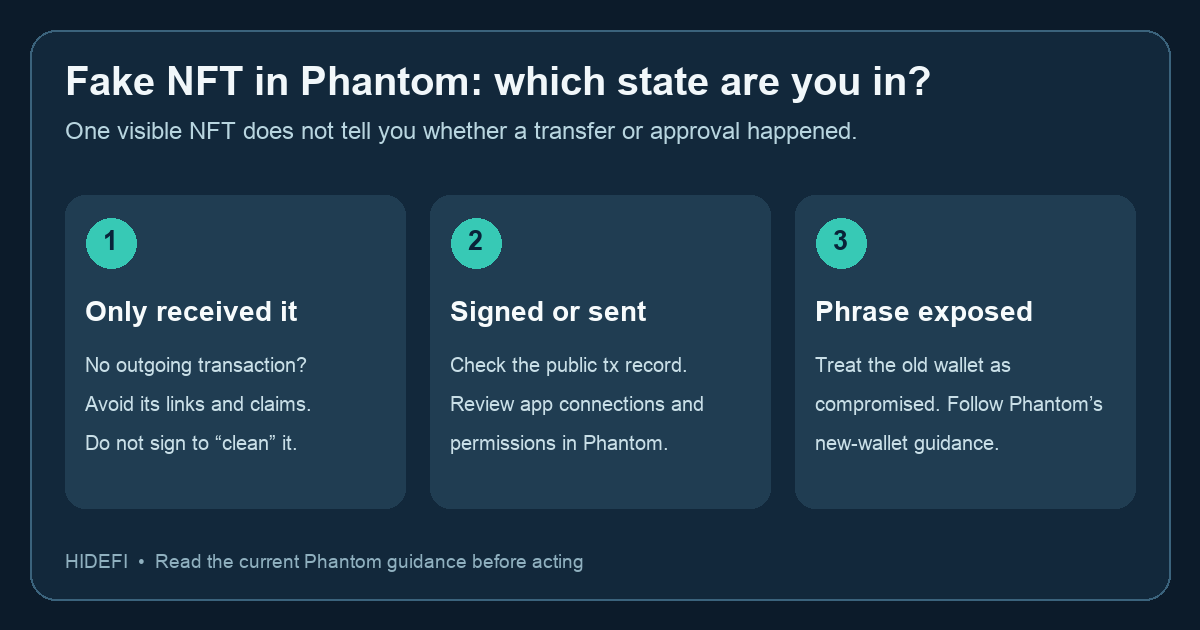
A Phantom user described a free NFT or airdrop, an approval, and then an empty SOL balance. Their question was whether the money could be recovered. The first answer is hard: Phantom cannot reverse a confirmed transfer or retrieve stolen funds. The next useful question is whether the old wallet is still exposed. Phantom's current scammed-wallet guide separates a malicious app connection, an ongoing permission, and an exposed recovery phrase because each calls for a different response.
Illustrative reconstruction: You open an NFT claim page, approve something in Phantom, and later see a lower balance. It is easy to blame the NFT just for appearing in the wallet. But receiving an unknown NFT alone does not spend your funds; the risk starts when you follow its link or approve a transaction. The transaction history and public explorer give a better starting point than the NFT image.
Did a transfer actually leave the wallet?
Open the activity record and follow its public explorer link. Check the chain, transaction hash, timestamp, and outgoing asset. A confirmed outgoing transfer tells you what happened on-chain, although it may not prove which website or permission caused it. If you only received an unfamiliar NFT and there is no suspicious outgoing transaction or approval, do not sign another request to “clean” or claim it. Phantom advises leaving unknown tokens and NFTs alone.
If a transaction is still pending, do not describe it as a completed theft or submit another transaction merely to test the wallet. Verify its state on the explorer and use current Phantom support guidance for the chain involved. A displayed balance can lag; the public record is the check for a transfer, not a guarantee that every position or token is visible in the wallet app.
What should you secure first?
If you connected to the fake page or approved a suspicious request, stop using it. In Phantom, the official guide points to Settings → Connected Apps to disconnect unfamiliar apps. It also warns that disconnecting does not revoke token spending permissions. The same guide names network-specific revocation tools for Solana and EVM networks; follow its current link and inspect the request carefully before signing. Revoking a permission may prevent later use of that permission, but it cannot undo an already confirmed transfer.
If you entered or disclosed your recovery phrase or private key, treat the old wallet as compromised even if you disconnect every app. Phantom says to create a new wallet with a fresh recovery phrase and move only trusted remaining assets. Its move-to-new-wallet guide distinguishes recovery-phrase wallets from Google or Apple sign-in wallets and reminds you to check staked assets, DeFi positions, perps, and Cash before leaving the old wallet. Check destination address, network, and fees before any transfer; do not send unknown tokens just to empty the account. If you cannot tell how access was gained, Phantom recommends treating the wallet as compromised.
Can the lost funds come back?
Phantom cannot freeze assets or reverse confirmed blockchain transactions. That does not mean you should discard the evidence. Preserve the public hash and suspected scam link after securing the wallet, then use our Phantom scam reporting guide for the official reporting routes and their limits. Anyone promising guaranteed recovery in a DM, or asking for a phrase, fee, or wallet signature, is another risk.
The practical result is a verified on-chain state and a safer next action: leave an unsolicited NFT alone if nothing was signed; disconnect and review permissions after a suspicious approval; or replace the wallet when a secret may be exposed. None of those actions restores a confirmed stolen transfer.
Official sources
Product interfaces and recovery policies can change. Confirm the current steps before acting.