See why OneKey App can show a hardware wallet balance while the device is unplugged, and what still requires device approval.
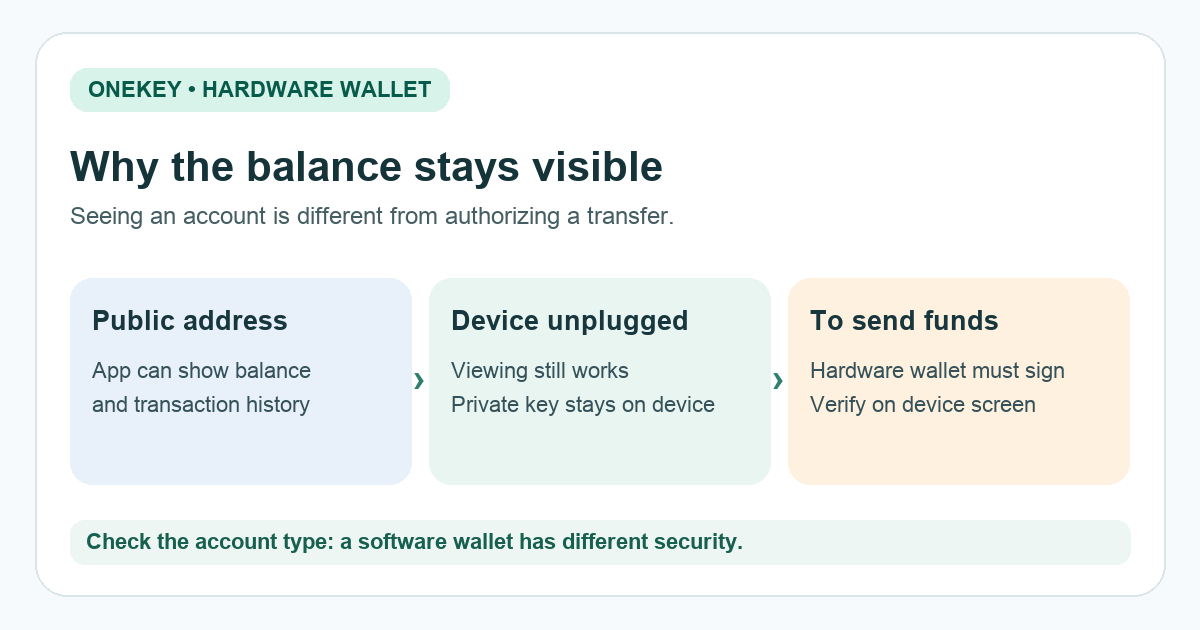
A OneKey user asked why the desktop and Android apps still showed a balance after the hardware device was disconnected. That display alone is normal for a paired hardware wallet. The app can read public account information without holding the private key needed to sign a transfer. OneKey explicitly says that balance and price viewing can work without the device in its companion-app terms.
Why does the balance remain visible?
Think of the address as a public account number. The app already knows which addresses to watch, so it can look up their on-chain history and show a balance after the device is unplugged. OneKey's watch-only explanation makes the important split: public addresses are enough to view activity; a private key is needed to sign a transfer. The diagram above shows that split. It is a model of the process, not a capture of the OneKey interface.
Illustrative scenario: I close the app, unplug the device, and reopen the app. The familiar account is still there, which initially feels as though the computer has gained access to my coins. The useful clue is that viewing an address is different from authorizing a transaction. The balance screen does not demonstrate that a payment can be sent.
Can the app move funds with the device disconnected?
For an account paired to a OneKey hardware wallet, a transaction still needs the device to sign it. OneKey's security documentation says hardware-wallet private keys and recovery phrases cannot be displayed or exported from the app. Do not test this by sending funds to an unfamiliar address. If you later make a legitimate transaction, inspect its details on the device screen before approving it.
This answer depends on the account type. OneKey App can also hold a separate software wallet, whose keys are stored on the phone or computer, according to the OneKey terms. A balance screen alone cannot tell you which account you selected. Check the account's wallet type in the official app if you are unsure; do not assume every account shown is hardware protected.
Does seeing a balance without a PIN mean the app is unlocked?
The device PIN and the app's own lock are different controls. OneKey documents an app password and optional passkeys, with some bypass settings. An open balance screen may expose your holdings to someone who can access that computer or phone even though it does not give them the hardware signing key. Check your app lock and device access settings if that privacy matters to you.
If you are being asked to enter a recovery phrase to make the displayed balance 'secure' or 'synchronize' it, stop. The normal read-only display does not require that step. HideFi is independent of OneKey and cannot inspect your wallet.
Official sources
Product interfaces and recovery policies can change. Confirm the current steps before acting.