Suspicious MetaMask transfer? Secure the wallet, gather public evidence, and report the scam through official channels.
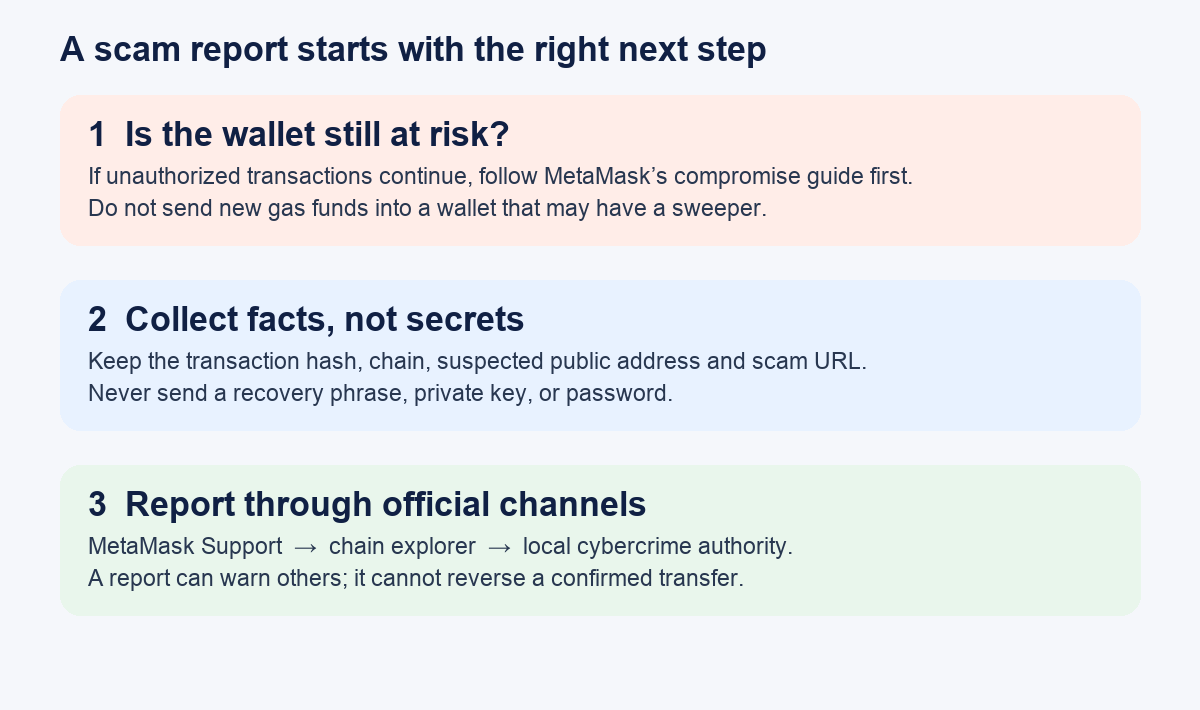
The frightening part is often the pause after you spot a suspicious transfer: where do you report a MetaMask scam, and what should you do before filing? The example below is illustrative; HideFi did not handle a victim's wallet.
Short answer: If your wallet may still be compromised, follow MetaMask's account-compromise steps before spending time on a report. Then contact MetaMask Support through its own help site, flag the suspected address on the relevant block explorer, and report the incident to your local cybercrime authority. A report can help warn others; it does not reverse a confirmed transfer.
I saw a suspicious transfer. Should I report it first?
Imagine noticing an outgoing transaction you do not remember. Before calling it theft, open the transaction on the correct network's block explorer and compare the time, recipient, dapp and amount with your own recent actions. MetaMask recommends this check. If the details match a transaction you did make, that changes the diagnosis. If you still cannot account for it, treat the wallet as potentially compromised.
This is the moment to stop using the old wallet for new activity. MetaMask's compromise guide describes creating a new wallet in a separate browser profile or device and moving any remaining funds you can safely move. If you suspect a sweeper—a script that automatically drains incoming funds—do not add gas money to the compromised wallet just to attempt a transfer. Use MetaMask's linked sweeper guidance or official support for that case. Never type a recovery phrase into a “recovery” site, and never share it with a helper.
What information should I gather for a MetaMask scam report?
Once the immediate risk is addressed, collect the public transaction hash and chain, the suspected scammer's public address, and the website, email or message that led you there. If you are unsure which address was the scammer's, say so rather than labeling one as proven. Keep screenshots of the interaction for the support report, but remove personal data before posting anywhere public. MetaMask's reporting guide asks for the suspected address and the channel through which the scam reached you.
The diagram above separates the three jobs: protect what remains, preserve facts, and send reports. It is an original decision aid, not a MetaMask screen.
Where do I send the report?
Start at support.metamask.io and use its Contact support route. The current help page offers a way to continue without connecting a wallet. Describe what happened and supply public evidence; MetaMask says its team will never ask for your Secret Recovery Phrase. Do not trust a person who contacts you first by DM or offers a paid recovery service. MetaMask lists its official support channels.
Next, if you have a suspected address, open that address on the explorer for the correct chain. MetaMask's example for Etherscan shows More → Report/Flag Address on an address page. The cropped official screenshot below illustrates the menu; its exact layout may change. Other explorers may use different labels. A flag is subject to the explorer's own investigation, so do not assume your submission automatically labels the address.
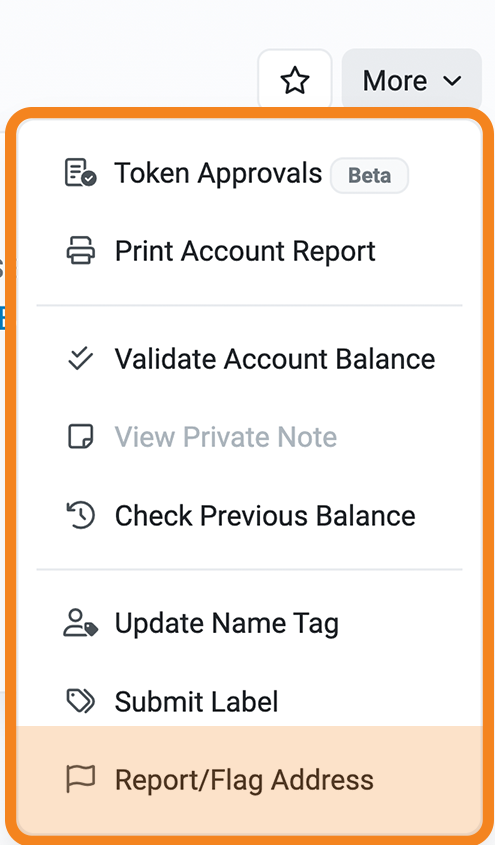
Etherscan menu crop from MetaMask's reporting guide; the example address was removed. Check the live explorer for its current layout.
Finally, report the loss to the relevant local cybercrime authority. MetaMask's guide lists examples, including IC3 in the United States, but jurisdiction depends on where you live. Preserve any case number and use it when following up with official support.
Will reporting get the crypto back?
MetaMask says it cannot reverse blockchain transactions or retrieve funds. The practical outcome of reporting is documentation and a chance for support, explorers or authorities to investigate or warn others. If the problem is an ongoing unauthorized transfer, return to the containment branch above rather than waiting for a report response. If you only received a suspicious message and did not connect, sign or send anything, do not give it a new opportunity by opening its link to “check.”
Official sources
Product interfaces and recovery policies can change. Confirm the current steps before acting.