MetaMask shows a zero fee and an error when sending native BTC. Check the first attempt on Bitcoin and find the extension update that includes the fee fix.
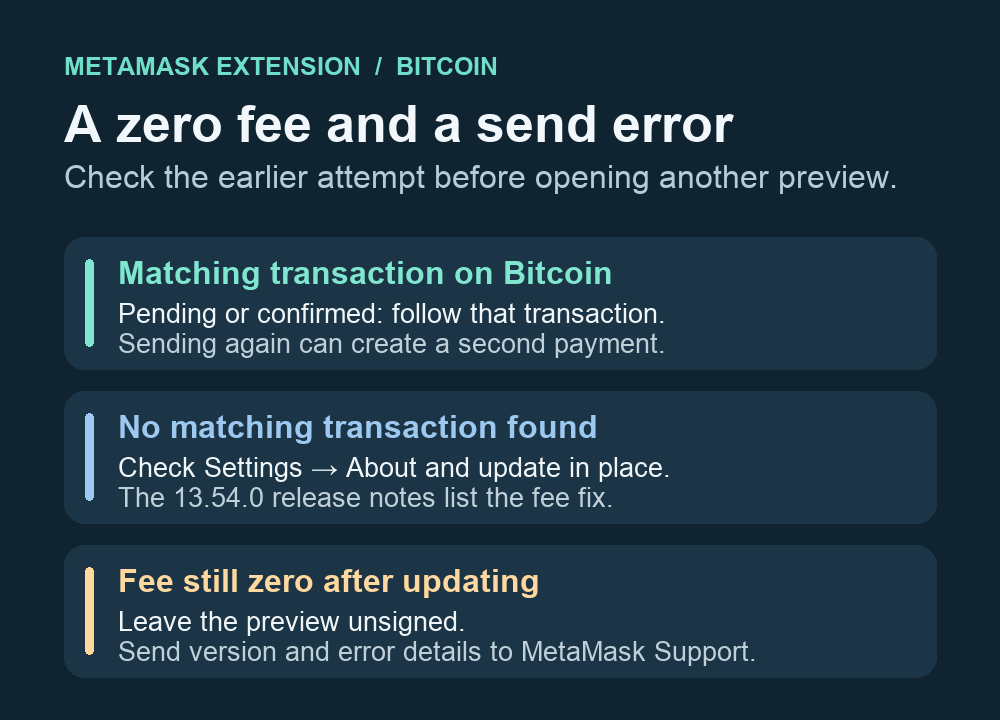
A MetaMask user trying to send native BTC saw a zero transaction fee and then a transaction error. MetaMask documents a Bitcoin fee fix in Extension 13.54.0. If you already pressed Confirm, check whether the first payment exists on Bitcoin before you update or try another send. The same user later reported seeing a confirmed payment in an explorer. The thread does not establish which attempt produced it, which is why the error alone is a poor guide to whether to retry.
Look for the first send in Activity
Open Activity in the same MetaMask account you used to send. MetaMask’s transaction history guide explains how to filter by network and open a matching entry. Compare its amount, destination and approximate time with the send you intended. If it has a transaction ID, look up that ID in a Bitcoin mainnet block explorer. A matching pending or confirmed transaction is the one to follow. A second send could pay the recipient twice. If you find no ID or no matching entry, the wallet display alone cannot establish that nothing was submitted. Check any transaction record you have independently, and wait or contact support if you still cannot tell.
Check whether your extension includes the fee fix
Go to Settings → About. If your version predates 13.54.0, let the browser update MetaMask in place. MetaMask’s update guide recommends closing every browser window and reopening the browser if there is no update prompt. Check About again afterward. The release notes confirm that the fix prevents zero-fee transactions when the estimator supplies a zero or very low fee rate. The implementation notes tie the change to MetaMask’s built-in Bitcoin wallet. The version here applies to the browser extension.
Once you have accounted for the earlier attempt, you can open a fresh native Bitcoin send preview and check whether it shows a fee. You can leave the preview unsigned. If it still shows zero or errors on an up-to-date extension, use official MetaMask Support and describe the extension version and exact error. For a different symptom where a wallet already displays a pending Bitcoin transaction, see what to check when a Bitcoin transaction is pending in Phantom.
Official sources
Product interfaces and recovery policies can change. Confirm the current steps before acting.