A Phantom BTC transaction can look pending in the app while no transaction appears on a Bitcoin explorer. Check the TxID before resetting the app.
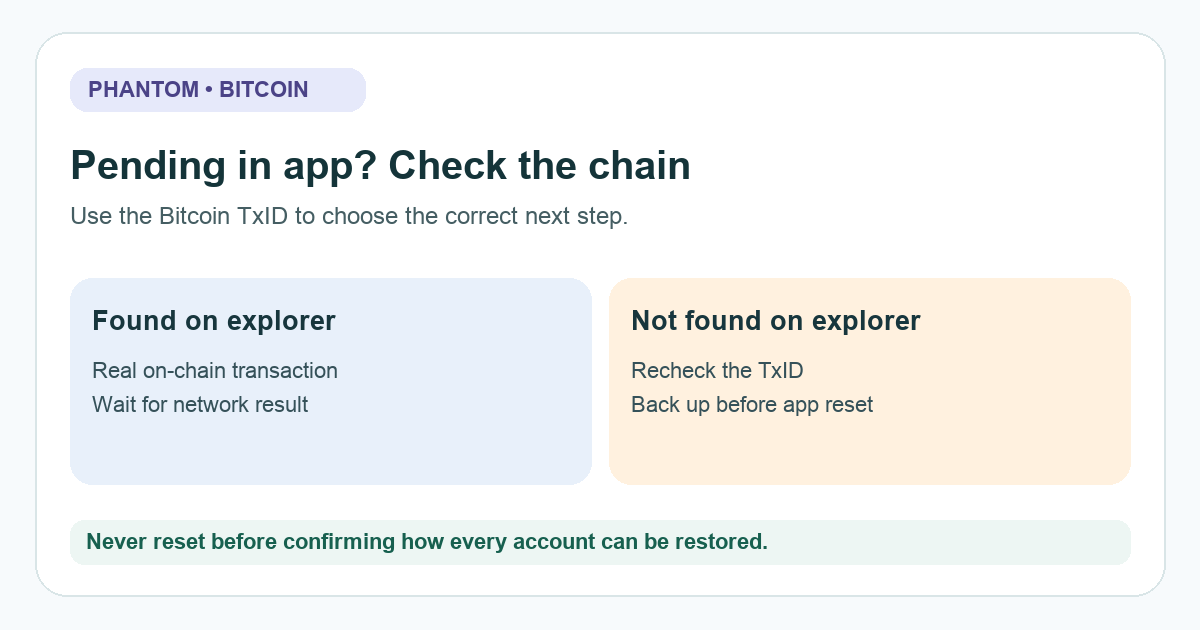
A Phantom user described an 'active' Bitcoin transaction that blocked another send, yet could not be found in the mempool. First check whether the transaction exists on the Bitcoin network at all. Phantom's current help guide separates an app-only pending record from a genuinely unconfirmed on-chain transaction. They need different next steps.
Is there a Bitcoin transaction ID you can verify?
In an illustrative example, I open Phantom and see 'pending.' It is tempting to wait indefinitely or try another send, but the useful clue is the transaction ID (TxID). Copy it from the wallet's transaction details if one is available, then search that exact ID on a Bitcoin block explorer such as mempool.space, which Phantom itself links for this check. Confirm you are looking at the Bitcoin transaction, not an unrelated swap or another chain. The diagram above shows the two branches; it is not a screenshot of the app.
If the explorer shows the transaction as unconfirmed, it has been broadcast and is waiting on the network. Phantom says a Bitcoin transaction cannot be sped up or canceled from Phantom. A low fee and network congestion can delay confirmation. Keep monitoring the real TxID; resetting an app does not cancel a transaction already on the network.
If the explorer has no record of the ID, the pending entry may be local to Phantom. An explorer lookup alone cannot prove the full cause, especially if the TxID was copied incorrectly or broadcast has not propagated. Recheck the ID and wait briefly; if the pending entry persists while no on-chain record appears, follow Phantom's app-cache troubleshooting route.
Before resetting Phantom, can you restore every account?
Do not reset or delete the app until you have confirmed the recovery method for every account in it. Phantom's reset guide specifically distinguishes a wallet made with a Secret Recovery Phrase, one made with Google or Apple plus a four-digit PIN, and separately imported private-key accounts. Each imported private key needs its own backup. Keep recovery material offline; never enter it into a website, chat, or message from someone offering support.
Only after that check should you open Phantom's official reset instructions and follow the sign-in path for your original wallet method. Phantom says restoring after the reset should clear a local phantom pending entry. If it does not, contact Phantom through the official help center with the public TxID and app version, not your recovery phrase. The Reddit user's reinstall outcome is one report, not a guarantee for every wallet.
Does the explorer show a confirmed transaction?
A confirmed transfer is no longer a pending-app problem. Check its destination address and output on the explorer before deciding what to do next; this guide does not reverse or recover a confirmed Bitcoin transfer. HideFi is independent of Phantom and cannot access the wallet.
Official sources
Product interfaces and recovery policies can change. Confirm the current steps before acting.