Ledger shows SOL staking rewards, but they are part of the delegated balance. Learn what the reward figure means and when SOL becomes withdrawable.
A Ledger user saw SOL rewards earned but a much smaller amount available to withdraw. The natural question is whether the rewards can be taken out while the original SOL keeps staking. For ordinary native SOL delegation in Ledger Wallet, no: the rewards are added to the delegated stake. They are not a separate liquid balance you can claim on their own. Ledger's current Solana staking FAQ says you must unstake a portion or all of the balance and wait for it to become withdrawable.
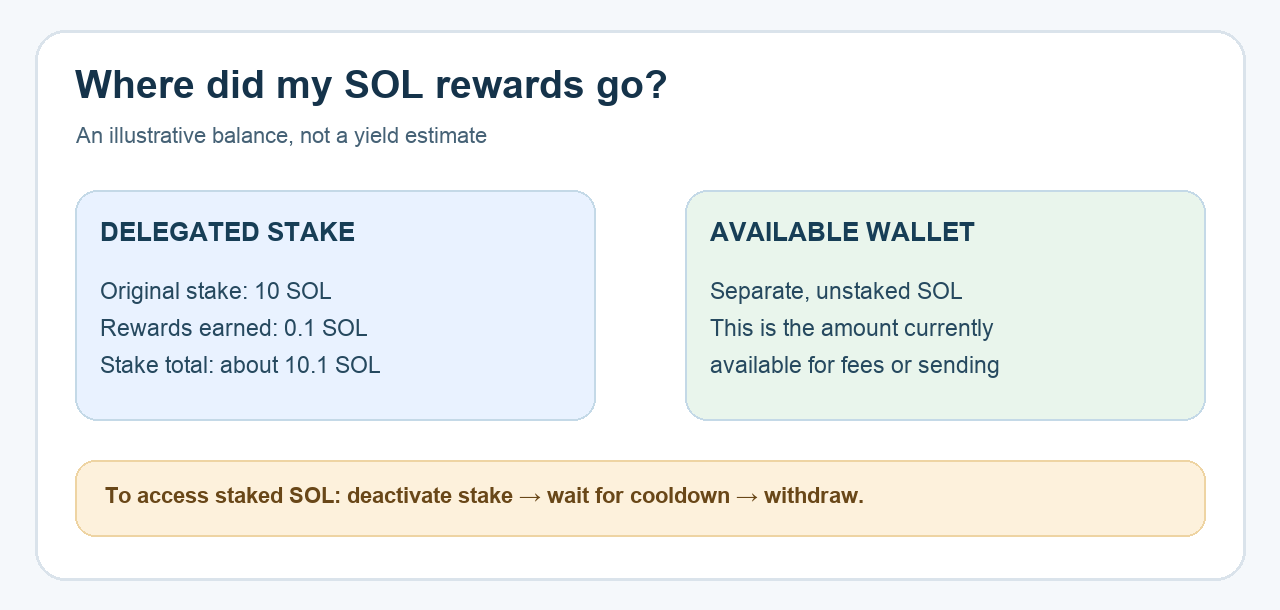
Here is an illustrative read-only check, not a stake operation HideFi performed. I would first separate the three numbers on the screen: SOL in the main wallet, SOL in the stake account, and rewards earned inside that stake. The diagram above shows why a reward can exist without appearing in the amount you can send today.
Why do rewards earned and withdrawable SOL differ?
In that first-hand discussion, a Ledger support reply explained that Solana rewards accrue to the delegated SOL balance. The user later confirmed the staked amount reflected that compounding. So a rewards figure is a record of what the stake earned; it is not necessarily a second pile of SOL in the main wallet.
A simplified example makes the distinction clearer. Suppose an account originally delegated 10 SOL and later earned 0.1 SOL. The stake account may then hold about 10.1 SOL, while the liquid wallet still holds only its separate unstaked balance. The example is arithmetic, not a promised yield or a screenshot of a real account. Actual rewards depend on validator performance, commission, and network conditions, as Solana explains.
If the stake balance has not changed as expected, verify that you are looking at the same stake account and validator and compare its on-chain history. A display discrepancy or unexpectedly low reward needs a separate investigation; it does not create a claim button.
Can I take just the rewards and leave the principal staked?
Ledger's answer is that you cannot simply withdraw the reward line while the same delegated stake remains active. To access SOL from that stake, you need to deactivate some or all of it and wait for the cooldown before withdrawing. Solana's stake-account reference explains that stake can be split, deactivated, and withdrawn subject to account state and authority. That is a network-level capability; it does not mean every Ledger Wallet screen offers a one-click “withdraw rewards only” action. Check the current options and amount in your own app before approving any change.
This distinction matters because undelegating is an on-chain transaction, not a harmless display refresh. The amount you deactivate stops earning rewards once deactivation takes effect, and withdrawal is not immediate. Ledger's FAQ describes roughly one epoch, about two to three days, as its typical cooldown; Solana's documentation says activation and deactivation timing can vary with network conditions. Keep a small available, non-staked SOL balance for transaction fees, as Ledger advises.
What if unstaking or withdrawal fails?
Do not repeatedly approve transactions just because the wallet's available number is smaller than expected. Confirm whether the stake is still active, deactivating, or inactive, and whether enough unstaked SOL remains for fees. Ledger's current troubleshooting page names insufficient available SOL and outdated Ledger Wallet software among possible causes of unstaking or withdrawal errors. Follow its current instructions for the exact error you see.
The decision is therefore simple even if the screen is confusing: earned rewards are in the stake, not separately spendable. You can leave them compounding, or choose to deactivate stake and later withdraw the amount the app and network allow. If the on-chain stake history does not reconcile with Ledger Wallet, contact Ledger through its official support site with public stake-account details only. Never share a recovery phrase or approve a transaction from a message claiming to “unlock” rewards.
Official sources
Product interfaces and recovery policies can change. Confirm the current steps before acting.