Got a Ledger letter with a QR code? Check the scam warning and what to do if you scanned it or shared your recovery phrase.
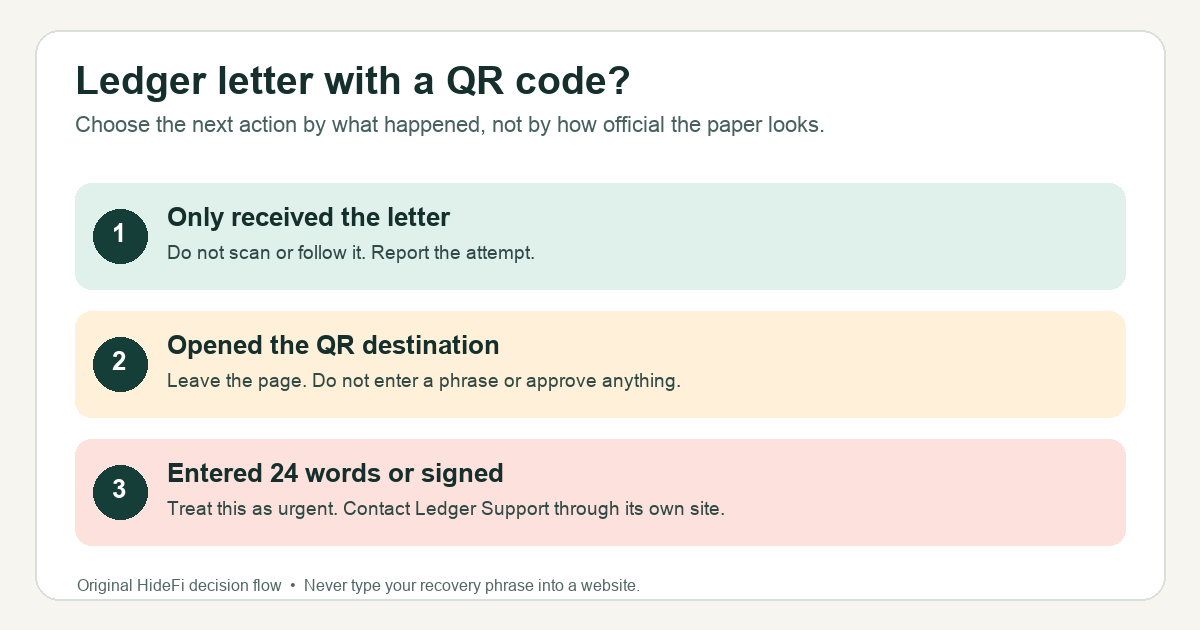
A Ledger user described a stamped letter with a personalized QR code. Another asked whether two unexpected Ledger letters were fake. The practical question is the same: is a Ledger letter asking me to scan a QR code a scam? Yes—Ledger says to assume a purported Ledger postal letter is phishing. Its current warning specifically describes letters that send readers to a QR code or website and eventually ask for their 24-word recovery phrase. Do not follow the letter's instructions.
Why does the letter look convincing?
The paper, stamp, logo, and even your name can make the request feel personal. But none of those details proves that Ledger sent it. In one reported case, the QR destination displayed the recipient's full name. The clue that matters is what the letter asks you to do. Ledger says it does not contact customers by postal letter and warns about this exact QR-code pattern. A website reached from the letter is not a safe way to verify the letter—even when the printed text mentions a real Ledger feature.
Here is an illustrative decision path, not a claim that HideFi tested a particular letter: imagine finding an urgent wallet-verification notice in your mailbox. Before touching the QR code, open a fresh browser tab and type ledger.com yourself. Compare the request with Ledger's phishing-campaign warning. That independent check tells you more than the letter's design.
What should you do if you only received the letter?
Do not scan the code, visit its printed address, call its number, install anything it recommends, or enter your recovery phrase. You can discard the letter after recording enough detail for a report. Ledger lists a dedicated phishing-reporting address near the bottom of its campaign page. Reach that page independently; do not use contact details printed on the letter. Never include your recovery phrase or private keys in the report. Ledger says it reviews such reports but does not normally reply individually.
Receiving a letter alone does not show that someone has your recovery phrase or has moved your funds. It does show that someone has enough contact information to target you. Keep future messages and calls in the same suspicious category and verify any claim through Ledger's own site.
What if you scanned the QR code?
First separate opening a page from giving it something. If you opened the destination but did not enter your 24 words, install software, connect a wallet, or approve a device prompt, close it and do not continue. Report the letter through Ledger's independently opened campaign page. Do not go back to the site to investigate its buttons. If you downloaded an app or approved an action, stop using the suspect app or page and ask official Ledger Support to help assess the specific exposure. Ledger warns against approving a transaction you did not initiate.
If you typed your 24-word recovery phrase into the QR destination, treat that phrase as compromised immediately. Ledger states that anyone who has it can access accounts derived from it. Use a fresh visit to official Ledger Support for urgent guidance on securing affected accounts; do not type that phrase into any other website, form, message, or support chat. A phishing report by itself cannot make an exposed phrase safe or reverse a confirmed transfer.
For a suspicious email asking you to update firmware, see our separate Ledger firmware-update email guide. The letter case has its own decisive clue: Ledger's current warning explicitly covers physical mail and QR codes.
Official sources
Product interfaces and recovery policies can change. Confirm the current steps before acting.