Phantom says an account might be malicious and transfers fail? Check public Owner and data-size clues without sending funds or assuming recovery is possible.
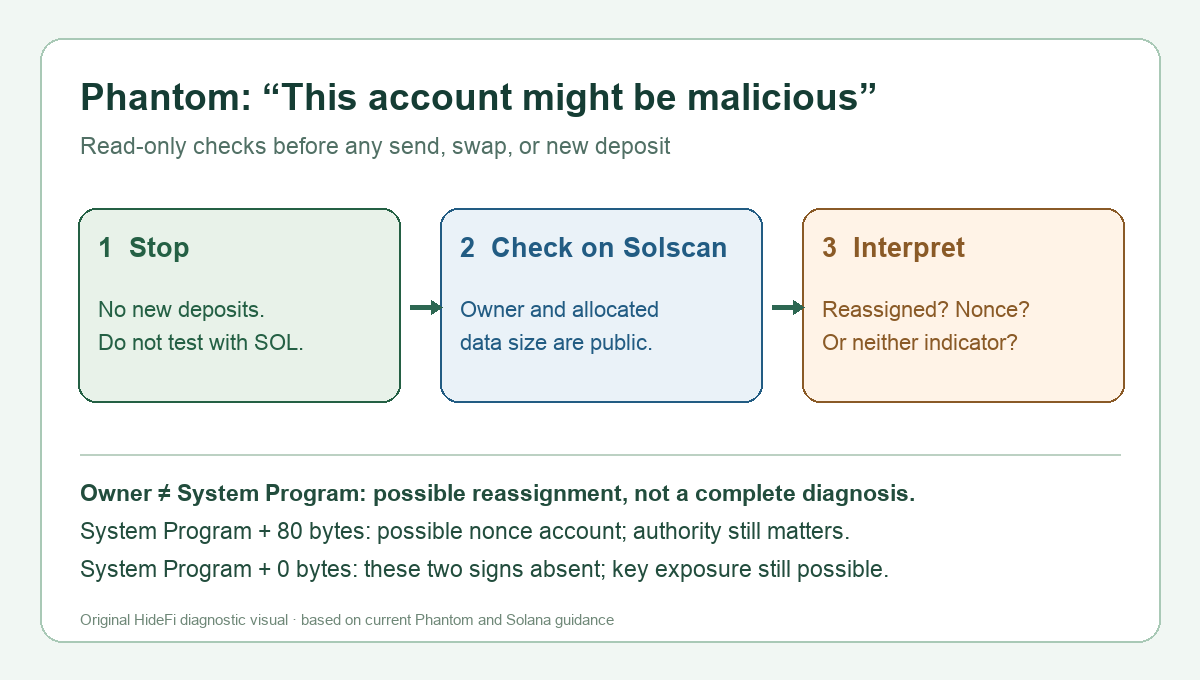
A Phantom user returned to a wallet and found a warning that the account “might be malicious.” Sending and swapping failed, so it looked as though Phantom had frozen the wallet. Their first-hand report does not establish the exact on-chain cause or a successful recovery. Phantom says this warning is not an app-level account block. It can flag a Solana account changed by a malicious transaction or other signs of compromise. Do not add funds to test it; new deposits could be lost. Start with public, read-only checks.
What does the Phantom warning mean?
Phantom's current malicious-account guidance separates three possibilities: an account reassigned to another owner program, an account converted to a nonce account with an authority the user may not control, or a wallet whose recovery credentials may be exposed even though those two on-chain indicators are absent. The warning alone does not tell you which applies. A failed send is not proof that Phantom itself is blocking transfers. The Reddit reporter tried another wallet and still could not send, but that does not diagnose anyone else's account.
A Solana account's Owner is the program allowed to change its data or debit its SOL, as Solana's account documentation explains. This is different from the human who knows a wallet's keys. A normal wallet account is owned by the System Program; a changed owner can affect what a wallet key can do. The public fields are useful clues, not a test of whether your recovery phrase is secret.
Check the public account fields without signing
Stay on the Phantom account that shows the warning. Phantom's help page says to copy its Solana address from Receive, then open Solscan separately and search that public address. On mobile, its described route is Home → Deposit → Receive Crypto; in the extension, Home → Receive. Read the account's Owner and Allocated Data Size fields. This is a lookup of public chain data. Do not connect your wallet, approve a transaction, share a recovery phrase, or enter it into any website just to inspect those fields. If the interface differs from these reviewed instructions, use Phantom's current help page rather than guessing at buttons.
The useful branches are:
- Owner is not System Program: Phantom says the account may have been reassigned. Direct SOL withdrawal may be unavailable. Do not assume changing wallet apps or importing keys will undo an on-chain owner change.
- Owner is System Program; Allocated Data Size is 80 bytes: Phantom says it may be a nonce account. If an attacker controls its nonce authority, SOL held directly in it may not be withdrawable by you. The size alone does not prove who holds that authority.
- Owner is System Program; Allocated Data Size is 0 bytes: Those two warning signs are absent. Phantom cautions that someone could still have the recovery phrase or private key. A “normal” Owner field cannot clear a security warning or prove the wallet is safe.
These are Phantom's conditional interpretations of the fields, not a diagnosis of the person in the forum post. Solana's System Program reference describes the separate assign and nonce-account instructions that make the distinction technically meaningful.
Can the SOL or other assets be moved?
There is no single answer from the warning or a visible balance. Phantom says SOL held directly in a reassigned account, or in a nonce account controlled by an attacker, may be inaccessible. Other assets may have different options if they remain in the affected wallet or connected protocols and the required permissions are still available. Phantom's help page discusses a third-party recovery tool, explicitly says it is unaffiliated and gives no recovery guarantee; it also describes a burn option that permanently destroys SOL rather than returning it. This article does not endorse that tool or tell you to sign, burn, transfer, or deposit funds. Confirm the account state and get case-specific guidance through Phantom's official help before taking an irreversible action.
In the original report, disconnecting apps and trying another wallet did not restore transfers. Those steps cannot reverse reassigned ownership or a changed nonce authority. If you believe the phrase or key has been exposed, stop using the affected wallet and follow Phantom's current security guidance; never put fresh SOL into the warned account just to pay a fee. For a different message that literally says “Transactions Disabled,” see Phantom's separate restriction guide. Guidance reviewed November 9, 2026.
Official sources
Product interfaces and recovery policies can change. Confirm the current steps before acting.