Check whether your Hyperliquid transfer needs a wallet signature, or whether USDC already moved and is tied up in perps collateral.
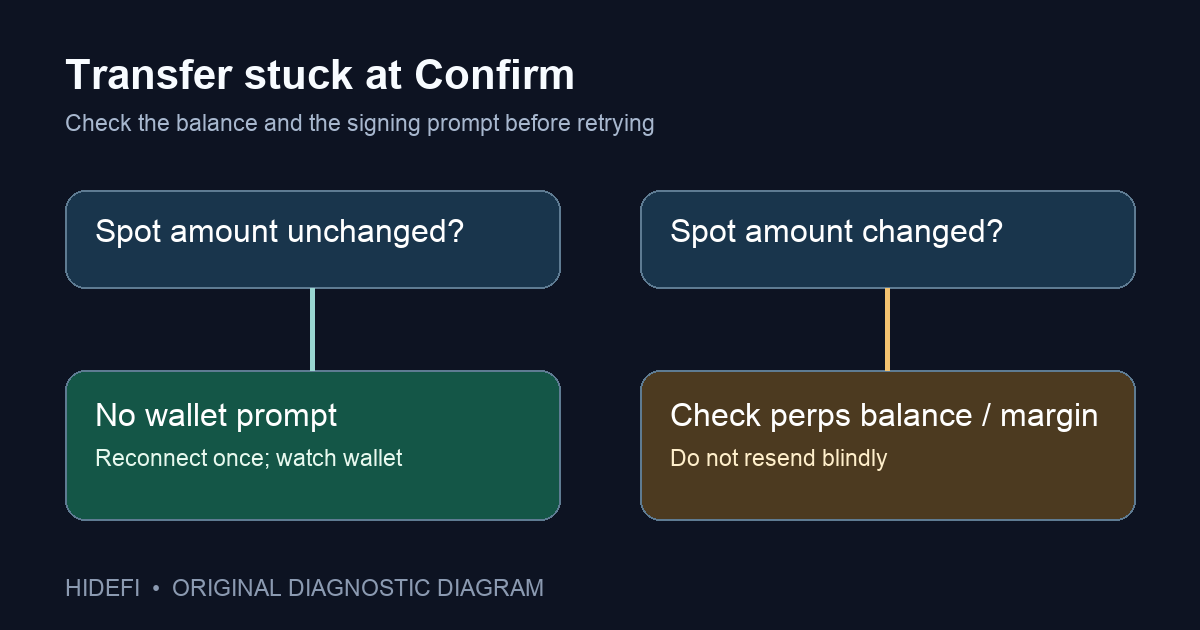
A Hyperliquid user described a spot-to-perps transfer stuck at Confirm. In that public report, they later found that Trust Wallet had not shown the signature request; disconnecting and reconnecting made the prompt appear. The report does not establish what their balances showed during the failed attempt. If your transfer is waiting at Confirm and your wallet shows no request, check the wallet connection first. Do not keep submitting the transfer until you know whether an earlier attempt completed.
This is a diagnosis for the missing-signature state, not a claim that every delayed balance has the same cause. Hyperliquid's wallet connectivity guide lists a stale connection, failed signing, and an extension that does not load as related symptoms.
Did the transfer finish, or did signing never start?
Before touching the connection, look at the spot and perps balances in the same account. If the spot amount fell and the perps balance changed, stop retrying: the action may already have completed. A lower available perps balance does not by itself prove the transfer failed; Hyperliquid explains that open cross-margin positions and negative unrealized P&L can consume collateral in its missing perps balance guide.
If the spot amount is still there, Confirm is unresponsive, and no wallet prompt appeared, the request probably never reached a usable signing session. This is the point to troubleshoot the connection. The diagram above separates these two states; it is an original diagnostic flow, not a screenshot of Hyperliquid.
What if the wallet never shows a signature prompt?
Start with the low-risk step from Hyperliquid's current support guide: disconnect the wallet from Hyperliquid, then reconnect it and try the transfer again once. Watch the wallet itself for a request, including a mobile wallet's connected-app session if you use WalletConnect. The user in the public report said this restored both the terms prompt and transfer signing. That outcome is evidence for their case, not a guarantee for yours.
If reconnecting does not help, confirm the wallet extension is enabled and current, then hard-refresh the browser. Those are also listed in Hyperliquid's guide. For WalletConnect, Hyperliquid says a stale session can hide mobile sign prompts; remove the old connected-app session in the wallet, then reconnect from the interface. Keep the account address the same when comparing balances.
The prompt appears, but Confirm still does not complete
That is a different branch. Read the wallet's actual rejection or error rather than repeating the missing-prompt fix. If you signed and the spot amount changed, use the account balances and transfer history to investigate where the USDC went. If the app still gives no usable result, use Hyperliquid's official support route and include the public account address, approximate time, wallet type, and exact error text. Never send a recovery phrase or private key to anyone offering to “fix” a stuck transfer.
The practical result is simple: no signature prompt plus unchanged spot balance points to the connection check; a changed balance calls for transfer and collateral checks. Those observations tell you which problem you actually have before you try again.
Official sources
Product interfaces and recovery policies can change. Confirm the current steps before acting.