If the dYdX Deposit button loads forever, first check for a wallet approval or transaction hash. Then test the connection or track a submitted deposit.
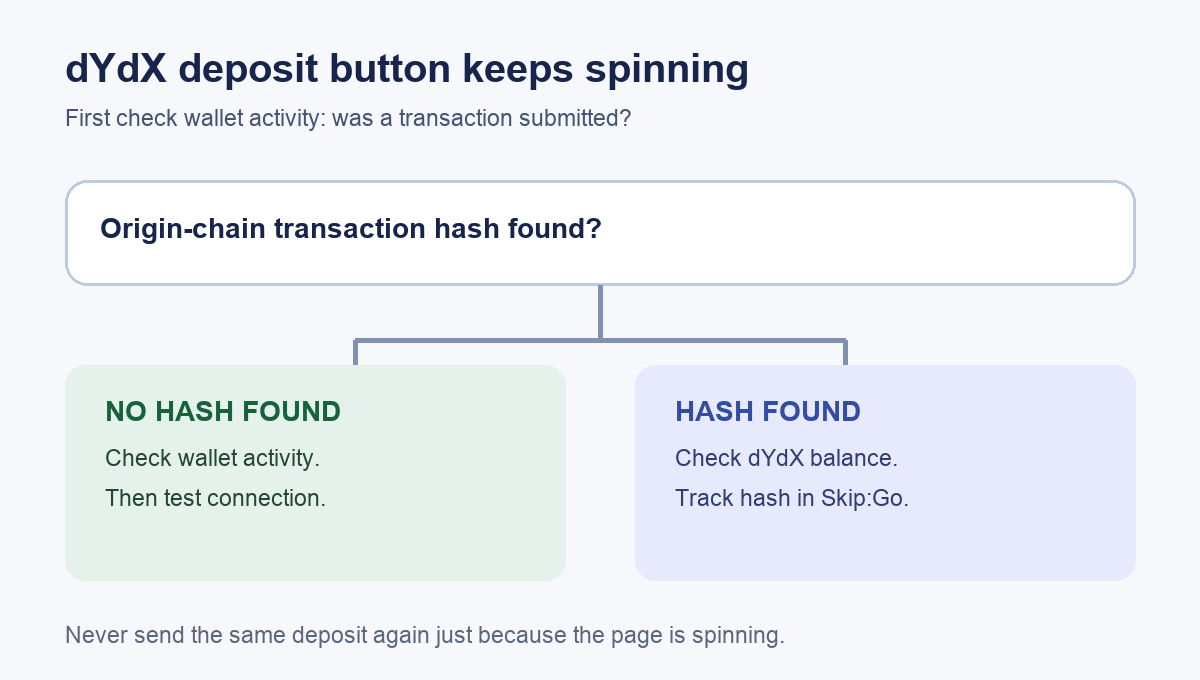
I can picture the moment: the wallet finally connects, I press Deposit, and the button just keeps spinning. That does not tell me a deposit is on its way. Before trying again, I would look for a wallet approval or an origin-chain transaction hash. This is an illustrative troubleshooting scenario, not a transaction HideFi performed. A dYdX user described the same endless deposit icon, but did not confirm what caused their case.
The useful first split is simple: no transaction hash found means check wallet activity before treating the spinner as a connection problem; an origin-chain hash exists means track the submitted deposit. A wallet approval alone is not proof of final confirmation. The current dYdX deposit guide treats these as different situations.
The button spins and you cannot find a transaction hash
If I cannot find an origin-chain hash, I would not assume funds left my wallet, even if a wallet approval screen appeared. I would first check wallet activity and the relevant chain explorer for any submitted transaction. That check matters because a frozen button is a website symptom, while a confirmed transaction needs a different investigation.
For the infinite loading button, dYdX says DNS-level ad blocking can interfere with its chain connection. Its suggested test is to change the internet connection, such as Wi-Fi to mobile data or the reverse. I would reopen the official dYdX site on the other connection and see whether the button progresses to a normal review or wallet approval. This is a connection test, not a reason to send funds twice. An old report of the same spinner does not establish that DNS blocking caused every case. Read dYdX's current explanation.
If the spinner persists on both connections, I would use Help → Live Chat from the official dYdX site and describe the device, browser, wallet, source network, and exact point where loading stops. No one in support needs a recovery phrase or private key.
You have an origin-chain transaction hash
This is the branch I would check before pressing Deposit again. A hash changes the question from “Why is the button loading?” to “Where is my submitted deposit?” The dYdX troubleshooting guide says to check the dYdX balance first, then use the origin hash in Skip:Go Explorer. It gives different waiting checks for Instant and Standard deposits: 5 minutes and 30 minutes, respectively. These are troubleshooting thresholds, not delivery guarantees.
If the tracker is incomplete beyond the applicable threshold, dYdX directs users to official support with the public hash and addresses. If the tracker shows completion but the trading balance is missing, its guide describes a separate destination check on Mintscan. I would follow that official route or ask support; I would not import a seed phrase into another wallet just because the deposit page is confusing.
What counts as a resolution?
For the loading-button case, success means the official deposit flow advances to a normal confirmation on a working connection, with no unexpected prior transaction. For a submitted deposit, success means the balance appears in the intended dYdX account. If neither happens, preserve the public transaction hash when one exists and use dYdX's official support route. The original user's spinner report did not include a confirmed fix, so the connection change is a documented diagnostic, not a promise.
Official sources
Product interfaces and recovery policies can change. Confirm the current steps before acting.